Showing posts with label technology. Show all posts

Tuesday, September 27, 2011

IC39 - Hold it! Cell phone case

Over at Just Crafty Enough, the Iron Craft Challenge is Hold it.  We're to make a case or a bag.

I recently got a new phone.  It was a new model that had just came out and there aren't many accessories for it.  The only case that Best Buy had when I bought it was a black one.  I really was hoping to get something a little more fancy since I couldn't do that with my old phone. So I started thinking about making one, not one that is a pocket for my phone, but one that I can leave on while I'm using it.

So, I looked through my fabric stash, found a piece I liked and decided to try making my own.

First, I took a piece of paper and traced around my phone.  Then, I took a ruler and added two inches to the top and bottom and one inch (twice the thickness of my phone) to each side and drew a larger rectangle around the tracing I had made before.

IMG_1497

Next, cut out the rectangle and use it as a pattern to cut out the fabric.

Phone Case 2

Fold the long edges down 1/2 inch (the thickness of my phone) and sew both sides.
PhoneCase3
Next lay the phone in the center of the fabric, with the RIGHT side facing up. Bring the sides up and hold them there with a couple of rubber bands.
IMG_1502
Next fold up the ends to where you want them. Ideally, not covering the screen or any buttons, but in my case in order to stay on, it has to cover the buttons, but I can still keep it from covering the screen.

IMG_1504

Now, with needle and thread sew the corners and up the side a bit so that the bottom is closed. Then trim the excess fabric.
IMG_1505
Next, I took it off the phone, turned it right side out and tested the fit. It fit pretty well, so I did the same thing with the other end.

IMG_1507

Then I turned it right side out and checked the fit.

I was surprised by how easily it comes off and goes on.
I was also surprised that the buttons work ok even through the fabric (including the non hard ones).  So I don't need to cut a hole out of the bottom piece like I was originally planning to, unless I have problems remembering which one is which.  I'm planning on cutting holes out for the camera on the back and the top.

Wednesday, June 22, 2011

IC25: Scan This!

They're popping up everywhere.  I saw them on my cup from a fast food restaurant, I see them in ads, on the cover of my phone book, even on signs at the zoo and a concert.  What are they?  QRCodes!

I'm a little behind technology wise, right before we went on vacation, I got an app for them.  Unfortunately, my beloved Centro is getting to be old technology, so I could only find one app and it worked fine the first few times then refused to recognize the codes, furthermore, it messed up my camera app, so I've unfortunately had to remove it.  (just one more pro in favor of an upgrade!)

I haven't done too much with QR Codes until this round of The Iron Craft Challenge.  But the inner geek in me, was intrigued.  It turns out that to allow a lot of devices to read these codes, there is a lot of redundancy and error checking built in.  What does that mean?  It means that some people have started to exploit that by doing custom QR Codes that incorporate an image, or a style to help convey their message.  So I decided to give it a try.

I started with QRStuff.com and generated a QR Code that just has text (it turns out there are different types of information that a QR Code can contain, in addition to just URLs).

qrcode.799779

This code has the text of John 3:16.

Then, I decided to modify it a bit and changed it to have a cross:

qrcode.revised2
Due to the redundancy in the codes, you can change them some without breaking them for most QR Readers.  Now, the software tester in me kicks in here and wants to point out that they're no longer up to the 'spec' for a QR Code so it's very possible that there are readers out there that will not scan them correctly.  But what's the fun in that?

Now that I've got the code, what should I do with it?

It'd be cool on a T-shirt, even just on a piece of card stock.  It's an interesting outreach method.  As a geek, I'd scan it to at least see if it's a valid code.  Some websites are selling QR Code temporary tattoos for people to use to exchange info at trade shows.  (It'd be an interesting twist on the kid tattoos for contact info too)

I decided to follow the directions here and transfer it to a piece of wood to make a necklace.  Can you say fail? LOL

IC25: Fail

Next time, I'll try to paint the wood first that will hopefully make it more distinguishable and will keep the ink from soaking into the wood so much.

So, I was back to what to do with the code after I made it. I originally was going to try to print it on shrink plastic but wasn't sure it would still be scanable afterwards. So I thought I'd try it. I tried to print on a small piece of shrink plastic I had left from another project. Fail again! My printer jammed LOL.

By this point I had a number of the codes printed out in various sizes, so I decided to just frame one.

IC25: Scan this

I've got a smaller version that I printed out that I'll probably attach to the wood with modge podge to make necklace.

Can you think of other creative uses for QR Codes?

Monday, February 14, 2011

Personalized Flash drives

I work for a software company and needed a gift to give my coworkers. I was looking for something that was "techy" but I was trying to keep the cost to under $10 a piece.  And I wanted something that would either be useful or amuse them.

So, I decided to make custom flash drives.

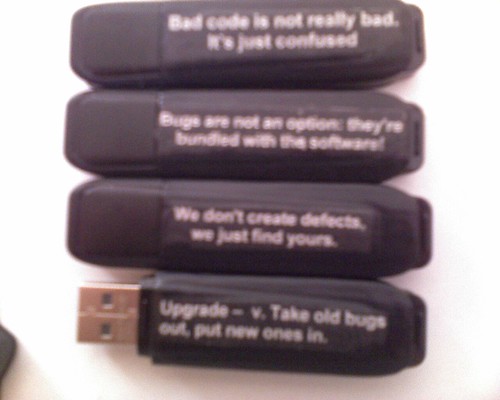
It's really hard to see (sorry for the poor picture quality, but I can't retake it now!) but they say:
"Bad Code isn't really Bad, it's just confused"
"Bugs are not an option, they're bundled with the software"
"We don't create defects, we just find yours"
"Upgrade - v. Take old bugs out, put new ones in"

Here's how I did it:

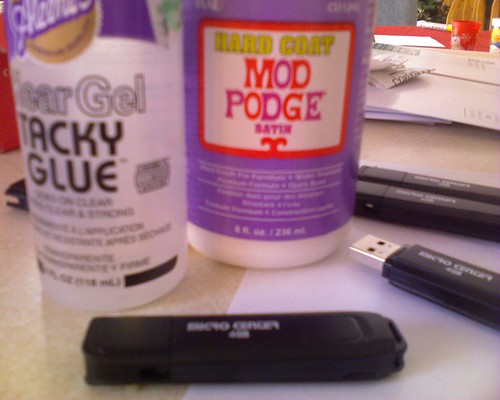
Materials:
Tacky Glue
laser print out of saying trimmed to size*
Modge Podge
paint brush
USB thumb drive

I printed the sayings out on a laser printer using white text on a black background (to match the case of the drive), trimmed them to size and then used the Tacky Glue to glue the saying on to the side of the drive. I removed the cap so I didn't accidently glue it on.  Leave it dry well.

Once it's dried well, coat it with Modge Podge.  I coated the whole side so that it wasn't as obvious that it wasn't on there originally. Let it dry a few hours and then add another coat, repeat a few more times. I put at least 3 coats on.

*I used a laser printer because ink jet ink will run with the modge podge.  I also used a background color to match the thumb drive.  Scrapbook paper would work well too!

Wednesday, March 10, 2010

WFMW - My Centro

Many years ago, I bought a Sony Clie (a PDA much like a Palm Pilot), at first, I used it a lot, but then as I had kids it was one more thing to carry around and I stopped using it for a while.  Fast forward a few years and technology has changed, and the phone/PDA combo devices are much better, so I take took the plunge a few years ago when I upgraded my phone and got a Palm Centro (it's a cell phone but runs PalmOS operating system so I can use many of the applications I used on the Clie).  It's a few years old now, but I still love it.

Here are some of the applications I use:

HandyShopper - this is a database program, originally designed to do shopping lists, which is what I mostly use it for. It let's me organize things by store (and aisle if I want) and can keep track of the prices things cost.  I also have a separate database for gift ideas, so when I'm struck with a gift idea, I can note it down and remember it later.

Countable - I knit and crochet.  Lately since I have so little time, I do a lot of it when I'm in the car travelling (hubby's driving).  Countable is a counter that let's me keep track of rows, increases, decreases, pattern repeats etc.  Mostly I just use it as a row counter.  With kids, I get interrupted a lot while I'm knitting.

Bible+ - The Bible on my cell phone, so I can have it with me all the time.  I can download different translations, jump to book and verse, and search for keywords.  Even see different translations in parallel.

Memorix - I stumbled on this one this past Christmas.  It's a memory game where you "turn over" the cards and make matches.  Great to entertain the kids when we're waiting in the store, at a restaurant, etc.

IM+ for Skype - I'm not sure if you're familiar with Skype, but it's a service that allows you to make phone calls from your PC.  If you're calling to someone else who has Skype, it's free. There's also a text based chat/IM method of communicating.  (I think I might talk about Skype next week, tune in!).  We use it a lot at work, since our offices are spread out, we need to do a lot of conference calls and we use the chats a lot when we need to ask quick questions of each other.  IM+ for Skype isn't made by the people at Skype, but they don't have a PalmOS client, so I had to turn elsewhere.  It's nice because I can answer questions from my employees while I'm away from my desk (ex when I'm at the pediatrician's office with my kids).  IM+ for Skype is one of the few programs I've actually purchased for my phone.

Pocket Quicken - Pocket Quicken is the other program I've paid for.  It's a version of Quicken (accounting/financial software) for Palm OS.  Hubby likes to keep track of all our expenses, receipts etc.  I was TERRIBLE with loosing receipts and not getting them to him.  I'm still bad when I'm in a hurry, but with Pocket Quicken, I can enter them into my phone right away or while I've got a spare minute and then Hubby just sync's my phone with his system (which has the full version of Quicken on it) and imports the data.  He's much happier now :)  Unfortunately, it wasn't made by Intuit and Intuit has terminated their agreement with the company that was making it, so you can't get new versions that work with current Quicken software.

Unit ConPro - At work, I frequently need to convert between bytes, megabytes, gigabytes with byte accuracy (1 GB = 1073741824 Bytes)  I could memorize the numbers, I could use the calculator in Windows, or I can use a unit converter like Unit ConPro (I also use the WWW Unit Converter, but lately ran into a bug with it).  It also will do conversions for Volume (cups, pints, teaspoons, etc) which comes in handy when you're doubling recipes, or trying to figure out which item at the grocery store is bigger.  It also does a whole pile of other unit conversions.  If you can think of it, I bet it does it!

pssh - An ssh client for PalmOS. For us tech folks.  I don't use it often, because most of the systems I need to ssh to aren't accessible via the internet and I don't want to install a VPN client on the phone (although they are available).

Documents to Go - I actually don't remember if I paid extra for this (I did for my old Sony Clie) or if it came with my phone, but this allows me to create/edit Office documents (Word, Excel, PowerPoint and plain text). It also allows me to view pdf files.  I mostly use this for recipes. I've got recipes that I store as plain text files on my computer and when I'm planning on making one, I put it on my phone so I don't need to print it out to make it.  You can also get some books from Project Gutenberg in plain text, although I find them a little hard to read that way.

Google Maps - We don't have a GPS, but I can get easy access to Google Maps from my phone and it can approximate where I am (based on which cell tower I'm using), sometimes with better accuracy than others.  But it's nice having access to the maps that Google provides when I'm out and about.

The other software I use is stuff that came with it, mainly the email client (which does pop and IMAP, although I've been having issues with it lately), the web browser (nothing special really), and the MP3 player (which I talked about on my audio book post).

Overall, my Centro is really working for me.  I'm hoping that there will be another good PalmOS based phone out when I'm ready to replace this one.  Check out other Works for Me Wednesday posts at Rocks in My Dryer.